Cluster Computing: Workflow
The explanation and examples provided in this section are HTCondor-specific terminologies and components, consisting extensive excerpts from the HTCondor Manual. The description provided here are brief snippets of their actual and potential functions. Refer to the HTCondor Manual for detailed explanations. All HTCondor functions and commands displayed here are work of the Center for High Throughput Computing, Computer Sciences Department, University of Wisconsins-Madison, Madison, WI.
Terminology
JOB : The JOB keyword specifies a job to be managed by HTCondor. This job is usually a submit file, which will be described later in the upcoming section.
JOB JobName SubmitFileName
PARENT … CHILD : The PARENT and CHILD keywords specify the dependencies within the DAG. A parent node must be completed successfully before any of the children nodes may be started. We use this to ensure the compositing job starts only after all specified registration jobs are completed.
PARENT ParentJobName... CHILD ChildJobName...
DAG : Directed Acyclic Graph (DAG) is used to represent a set of computations where the input, output or execution of one or more computations is dependent on one or more other computations. A DAG input file describes the DAG, and further submit description files are used by DAGMan when submitting programs to run under Condor. DAGMan is itself executed as a scheduler universe job within Condor. See HTCondor Manual for more information. A DAG file will be submitted using the tool condor_submit_dag by running the syntax as follow:
> condor_submit_dag <dagfilename>.dag
A very simple DAG input file:
JOB A A.sub
JOB B B.sub
JOB C C.sub
JOB D D.sub
PARENT A CHILD B C
PARENT B C CHILD D
VARS : The VARS keyword allows variables specific to a JOB node’s submit file to be defined. The variables hence can be stated in the submit description file as a macro, contained between $( … ). The VARS syntax can be used in a DAG file as follow:
VARS Jobname variablename = "string"
A simple example of a DAG file incorporating VARS:
# File name: example.dag
#
JOB A A.sub
JOB B B.sub
JOB C C.sub
VARS A testName = "TestA"
PARENT A CHILD B C
JOB A’s submit file - A.sub may then use the above-defined macro testName in an example as follow :
# File name: A.sub
executable = A.exe
log        = A.log
arguments  = "$(testName)"
queue
Note
See upcoming section for format of submit files used in the SAMS pipeline. Refer to the HTCondor Manual for detailed explanation.
SPLICE : A splice is an instance of a subgraph which is specified in a separate DAG file. This creates a named instance of a DAG as specified in another file as an entity which may have PARENT-CHILD dependencies.
SPLICE SpliceName DAGFileName [DIR directory]
A simple DAG spliced input file is
SPLICE file1 dagFile1.dag
SPLICE file2 dagFile2.dag
...
SPLICE file5 dagFile5.dag
Gluster : Gluster is a file share maintained by CHTC, and used for files or software that are too large for HTCondor file transfer. See http://chtc.cs.wisc.edu/file-avail-gluster.shtml for explanation. Note: This is an attribute unique only to CHTC and not generally available. As of September 25, 2017, Gluster is no longer used for the methodology described in this protocol.
Main Components
In this section we go through the main components used in setting up the SAMS pipeline with the CHTC machine pool. Shown below is the workflow set up for SAMS pipeline when working with CHTC resources.
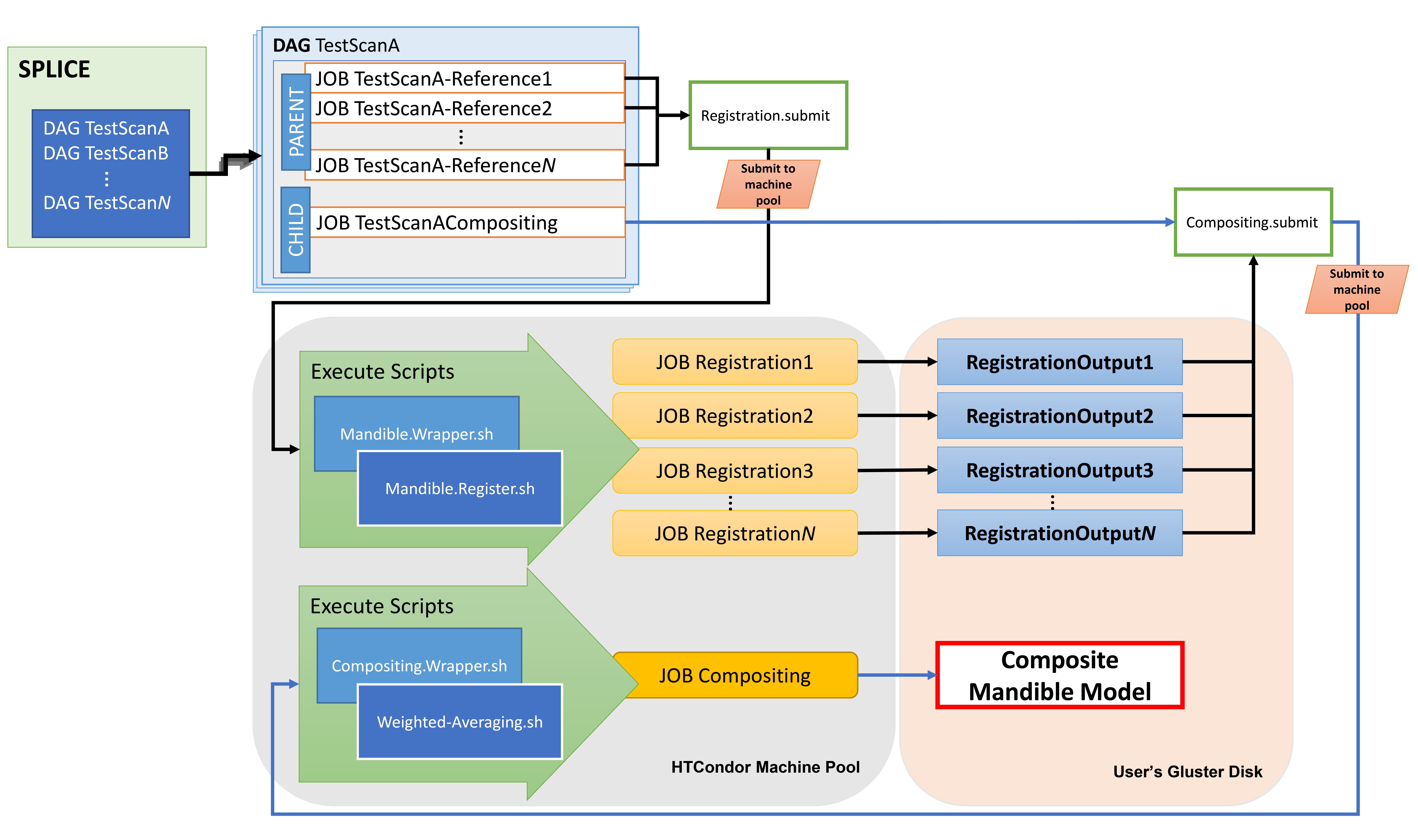
DAG File
Sample dag file
JOB TestA-RefA Registration.submit
VARS TestA-RefA id=“mandible.submit”
VARS TestA-RefA test_name=“F001-00-01-002”
VARS TestA-RefA test_model=“F001-00-01-002-M-trim.nii.gz”
VARS TestA-RefA refName=“F155-10-00-002_trimmed.nii.gz”
VARS TestA-RefA refModel=“F155-10-00-002-M_trimmed.nii.gz”
VARS TestA-RefA Now=“<timenow>”
...
JOB TestA-Compositing Compositing.submit
VARS TestA-Compositing id="mandible.compositing"
...
PARENT TestA-RefA TestA-RefB ... CHILD TestA-Compositing
Submit File
The HTCondor scheduler relies on a Submit File that communicates everything about our job(s) to the scheduler. A submit file is a text file that specifies the executing job/script, arguments, variables, etc. (Refer to HTCondor Manual for detailed explanation).
The SAMS pipeline consists of two main submit files:
Registration.submit - A submit file for the Registration Job
Compositing.submit - A submit file for the Compositing Job
The following are samples of the two submit files. Users should replace variables indicated between < … > accordingly.
Registration.submit
universe=vanilla
getenv=True
environment="ITK_GLOBAL_DEFAULT_NUMBER_OF_THREADS=1"
executable=<location>/mandible.wrapper.sh
should_transfer_files=YES
when_to_transfer_output=ON_EXIT
request_cpus=1
request_memory=4000
request_disk=6G

requirements = (HasGluster == true)
periodic_release=((JobStatus==5)&&((CurrentTime - EnteredCurrentStatus)>360))

transfer_input_files=<location>/mandible.register.sh,<location>/bin/c3d,$(test_dicom),$(test_model),$(refImg),$(refMod),<location>/fsl-5.0.8-chtc-built.tgz,<location>/ants-chtc-built.tgz

arguments="$(now) $(test_name) $(refName) $(Cluster) $(useModel)"
log=$(id)_T-$(test_name)_R-$(refName)_$(Cluster)_$(now).log
output=$(id)_T-$(test_name)_R-$(refName)_$(Cluster)_$(now).out
error=$(id)_T-$(test_name)_R-$(refName)_$(Cluster)_$(now).err
notification=Error
notify_user=<user@email.com>
stream_output=True

queue
Compositing.submit
universe=vanilla
getenv=True
environment="ITK_GLOBAL_DEFAULT_NUMBER_OF_THREADS=1"
executable=<location>/compositing.wrapper.sh
should_transfer_files=YES
when_to_transfer_output=ON_EXIT
request_cpus=1
request_memory=10000
request_disk=8G
requirements = (HasGluster == true)

transfer_input_files=<location>/weighted-averaging.sh,<location>/mandible.unpack.sh,<location>/bin/c3d,<location>/$(test_model),<location>/fsl-5.0.8-chtc-built.tgz

arguments="$(now) $(test_name) $(dir_name) $(Cluster) $(comp)"
log=$(id)_T-$(test_name)_O-$(dir_name)_$(Cluster).log
output=$(id)_T-$(test_name)_O-$(dir_name)_$(Cluster).out
error=$(id)_T-$(test_name)_O-$(dir_name)_$(Cluster).err
notification=Error
notify_user=<user@email.com>
stream_output=True

queue
Note
The line requirements = (HasGluster == true) is a CHTC-only attribute and not generally available.
Executing Scripts
As shown in the flowchart above, there are two executing scripts for the Registration step and Compositing step respectively. These two steps are linked through a PARENT-CHILD dependency listed in the submit DAG file. The two scripts consist of a “wrapper” script and an executing script.
Wrapper
Initiate and make referral to executing environment
Specify all variables and arguments need for executing script
Unzip and install software prebuilt on machine
Run executing script
Compile output into tarball and export to gluster
Executing Script
Run software with wrapper-specified arguments
Registration
Scripts used are
mandible.wrapper.sh
mandible.registration.sh
The executing script here will consist of commands specified in Basic Workflow/Automatic Segmentation and Compositing/Automatic Segmentation section.
Compositing
Scripts used are
compositing.wrapper.sh
weighted-averaging.sh
mandible.unpack.sh
The executing script here will consist of commands specified in Basic Workflow/Automatic Segmentation and Compositing/Compositing section.
Samples scripts will be provided here in late July